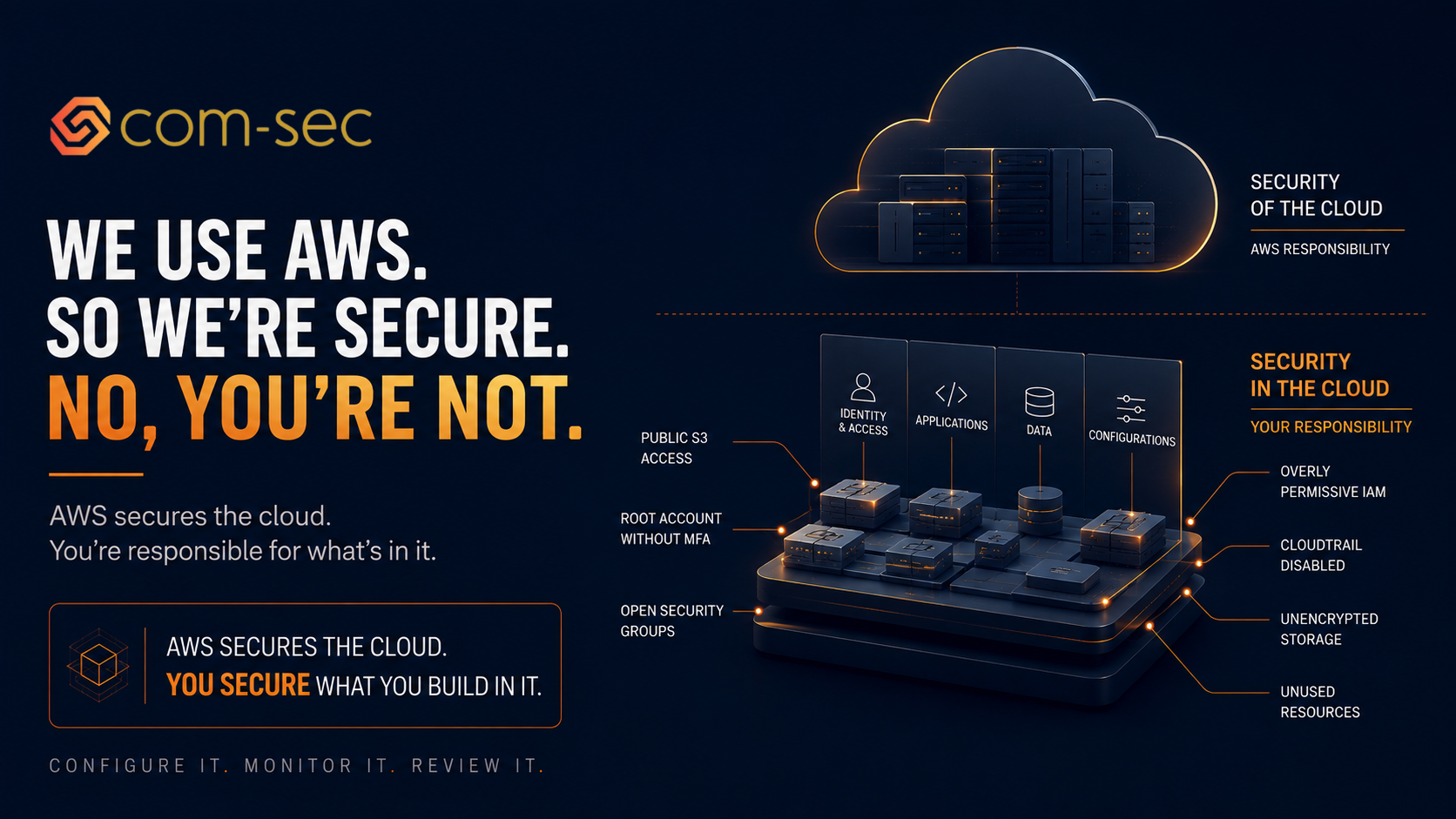
I hear this at least once a month. Sometimes from CTOs who should know better. Sometimes from founders who genuinely believe that choosing AWS (or Azure, or GCP) means their security is handled.
It's not. And the misunderstanding is costing companies real money, real data, and real customer trust.
AWS is secure. AWS has world-class physical security, network security, encryption capabilities, and availability. They invest billions of dollars annually in protecting their infrastructure. Their security team is larger than most companies' entire headcount.
Your configuration of AWS is a completely different story.
The shared responsibility model
AWS operates on what they call the "shared responsibility model." It's the most important concept in cloud security and the one most companies either don't understand or choose to ignore.
AWS is responsible for security "of" the cloud: the physical data centers, the hypervisor, the global network infrastructure, the hardware, and the foundational services. They handle physical access control, hardware lifecycle management, network segmentation at the infrastructure layer, and the availability of their regions and availability zones.
You are responsible for security "in" the cloud: everything you build on top of that infrastructure. Your data, your applications, your identity and access management, your network configuration, your encryption choices, your operating system patches, and your firewall rules.
AWS provides the tools to do all of this securely. Dozens of security services, hundreds of configuration options, granular controls for every aspect of your environment. But they don't configure them for you. They don't turn them on by default (with a few recent exceptions). They don't monitor your environment for misconfigurations. They don't know whether your S3 bucket should be public or private, because that's a business decision, not an infrastructure decision.
The shared responsibility model means AWS keeps the building secure. You're responsible for locking your own doors and windows. Most companies leave several wide open.
What we actually find in AWS environments
After assessing hundreds of AWS environments across startups and mid-market companies, the same misconfigurations show up over and over. They're predictable, preventable, and almost always the result of moving fast without someone focused on security.
S3 buckets with public access. This is still happening in 2026. Despite AWS adding multiple layers of warnings, account-level block public access settings, and console banners, companies still find ways to make buckets public — sometimes intentionally to serve static assets without realizing the entire bucket's contents become accessible, sometimes accidentally through overly permissive bucket policies. Customer databases, application backups containing credentials, and in one case at a health tech company, files containing patient information, have all turned up sitting in public buckets, accessible to anyone with the URL.
Root accounts without MFA. The root account in AWS is the god account. It can create and delete resources, modify billing, change security settings, and close the account entirely, and there's no way to restrict its permissions. If this account doesn't have MFA enabled, one compromised password gives an attacker complete, unrestricted control over your entire AWS environment. It takes 5 minutes to fix and it's the single most important security configuration in your entire AWS account, yet it's still missing at companies managing customer data.
Security groups open to the world. Security groups are AWS's instance-level firewall. Port 22 (SSH) open to 0.0.0.0/0 means anyone on the internet can attempt to connect to your server. Port 3389 (RDP) open to the internet means the same for Remote Desktop. Port 3306 (MySQL) open publicly means your database is accepting connections from anywhere. These configurations exist because someone needed quick access during development and never tightened it down, and they're an invitation for brute-force attacks and credential stuffing.
IAM policies granting admin to everyone. Building proper, granular IAM policies takes time, so many teams take a shortcut: give everyone the AdministratorAccess managed policy. That means every developer can modify billing, delete production resources, change security configurations, and read every secret. Least-privilege access limits the blast radius when an account is compromised; AdministratorAccess for everyone means a single compromised account gives an attacker everything.
CloudTrail turned off. CloudTrail is AWS's audit logging service — it records every API call made in your account, and it's your forensics data and incident investigation starting point. Some companies turn it off to save on storage costs, or never turned it on, or have it enabled in one region but not others. Without it, if someone deletes a database or an attacker accesses your account, you won't know what happened. Standard logging typically costs $2-5 per month.
No encryption on EBS volumes or RDS instances. AWS KMS makes encryption for storage and databases straightforward to enable with minimal performance impact, and it satisfies the encryption-at-rest requirements in virtually every compliance framework. Many companies don't enable it because it wasn't the default when their resources were created. For companies subject to HIPAA, SOC 2, or ISO 27001, unencrypted storage containing sensitive data is a finding waiting to happen.
Unused resources still running. Forgotten EC2 instances, orphaned databases, test environments that were never decommissioned, load balancers pointing to nothing. These resources cost money, expand your attack surface, and often run outdated software because nobody remembers they exist. Development and staging environments regularly turn up containing copies of production data with security groups more permissive than production — making the test environment the weakest link.
The fix
You don't need to hire a dedicated cloud security team to address these issues. You need to invest a few days of focused effort and then maintain the discipline.
Run AWS Security Hub. It's a built-in service that continuously evaluates your environment against best practices (AWS Foundational Security Best Practices, CIS Benchmarks). It'll surface the misconfigurations above and many more. Fix the critical and high findings first.
Enable CloudTrail in every region. Create an organization trail that logs API activity across all regions and all accounts. Send logs to a dedicated S3 bucket with versioning and encryption enabled. Set up alerts for high-risk events like root account usage, security group changes, and IAM policy modifications.
Enable GuardDuty. It's AWS's threat detection service. It analyzes CloudTrail logs, VPC flow logs, and DNS logs to identify malicious activity: compromised instances, unauthorized access, crypto mining, data exfiltration. It runs continuously and costs a few dollars per month for most small environments.
Enable AWS Config. It tracks configuration changes to your resources over time. Combined with Config Rules, it can automatically flag non-compliant configurations, like unencrypted storage or public security groups, and even auto-remediate them.
Review IAM quarterly. Remove unused IAM users and roles. Enforce least-privilege permissions. Rotate access keys. Use IAM Access Analyzer to identify overly permissive policies and resources shared outside your account.
Use SCPs for guardrails. If you're using AWS Organizations (and you should be), implement Service Control Policies that prevent dangerous actions at the account level: blocking public S3 access, requiring encryption, restricting which regions can be used. This prevents misconfigurations before they happen.
Do a quarterly cloud security review. 30 minutes. Review Security Hub findings, check for new resources, verify encryption, review security groups, confirm logging is active. Put it on the calendar.
The bottom line
AWS gives you some of the best security infrastructure on the planet. They also give you enough rope to hang yourself with. The misconfiguration risk is real and it's the number one source of cloud breaches. Not sophisticated attacks. Not zero-days. Misconfigurations that have been sitting in the environment since someone spun up a resource during a late-night coding session and never went back to lock it down.
Your cloud provider handles a lot. But the things they leave to you are the things that get you breached. Know what's your responsibility, configure it properly, and check it regularly.
"We use AWS" is a great start. It's not the finish line.
Farbod Fakhrai is the founder of Com-Sec, a cybersecurity and compliance consulting firm supporting startups and growth-stage companies.